
Most beginners skip keyword research and end up wasting months creating content no one searches for.
Here’s exactly how NOT to do that.
If you’re a blogger, affiliate marketer, ecommerce owner, or digital marketer, you’ve probably heard the phrase “keyword research is important” a hundred times.
But here’s the truth: most people skip it. They sit down, write what they think is amazing content, publish it, and then wonder why Google doesn’t rank it.
The answer is simple. They picked the wrong keywords.
This guide will show you exactly how to find keywords that actually convert, analyze them strategically, and build a content roadmap that ranks. By the end, you’ll have the confidence to target keywords that bring real traffic, leads, and sales, not just vanity metrics.
Let’s start.
TL;DR – Quick Summary
- Finding what people actually search for
- Pick keywords with Good Volume + Low Difficulty + High Relevance
- Check top 3 results BEFORE writing (saves 20 hours)
- Get your first 5 rankings with 0-20 difficulty keywords
- After 6 months, target harder keywords (40-60 difficulty)
- Google Keyword Planner (free), Ahrefs, Semrush, & Mangools (paid)
What Is Keyword Research?
Keyword research is the process of finding, analyzing, and strategically using the search phrases that people type into Google (and other search engines similar to Google) to find information, products, or services.
Think of it like this: instead of guessing what people want to read about, you’re listening to exactly what they’re searching for and giving them that.
That’s the power of keyword research
Why is Keyword Research Important for Digital Marketing
In 2026, keyword research isn’t optional; It’s a crucial part of any search engine optimization It’s the foundation of every successful online strategy.
Here’s why:
It connects you with your audience. A blog post on “content marketing tips” might be brilliant, but if nobody searches for that exact phrase, nobody finds you. Keyword research solves this mismatch.
It drives qualified traffic. The relevant keywords attract people actively looking for what you offer. Not just traffic. Not vanity metrics. Real visitors with intent to buy, learn, or sign up.
It saves you time and money. Without keyword research, you might spend 20 hours writing an article nobody searches for. With it, you know before you start whether your effort will pay off.
It gives you a competitive advantage. While competitors target obvious, competitive keywords, you find low-competition opportunities they miss. You rank faster. You earn more.
Advertisment
What You’ll Learn by the End
By the time you finish this guide, you’ll understand:
- What keywords are and why they still matter (even with AI and semantic search)
- The Keyword Tripod Rule isa simple framework to decide which keywords are worth targeting
- A 6-step process to research keywords like a pro
- How to do SERP analysis (before you write a single word)
- Real examples of keyword research in action
- Common beginner mistakes and how to avoid them
- Free and paid tools that actually work
Who This Guide Is For
This guide to seo is written for digital marketers, bloggers, content creators, affiliate marketers, and ecommerce owners who are new to SEO. We assume you know what a blog is. We don’t assume you know anything about the keyword research process.
If you’ve never done keyword research before, you’re in the right place. If you’ve done it but felt confused, this beginner’s guide will clarify everything.
Your Roadmap to Keyword Research for SEO
We’re going to move through keyword research strategically:
- First, we’ll understand the why (why keyword research matters)
- Then, the what (what keywords are and how they work)
- Then, the how (a step-by-step process to research like a pro)
- Finally, the do (real examples and action steps you can take today)
Let’s go.
Impact on Rankings & Traffic
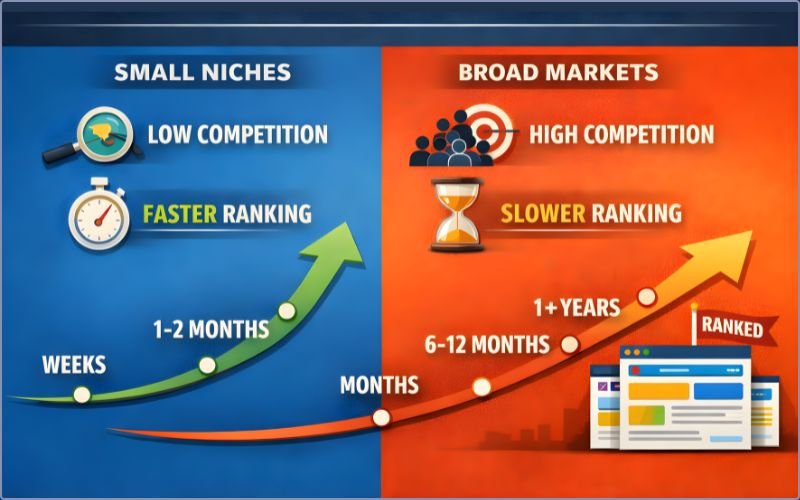
Here’s the scenario: You write an amazing blog post about “coffee machines.” It’s 3,000 words. You included everything. Great images. Perfect formatting. You publish it with pride.
Three months later, Google still hasn’t ranked it.
Why? Because you’re competing against Amazon, Williams Sonoma, major appliance retailers, and established review sites, all with massive authority.
Now, imagine instead you wrote about “best budget coffee machine under 5000 rupees for office use.” Lower volume. Much lower competition. You rank in 4 weeks instead of 4 months.
This is the difference keyword research makes.
The right keywords put you on the first page of Google faster. The wrong keywords? They keep you invisible, no matter how good your content is.
Why does this happen? Because Google shows the results it thinks best match what people are searching for. If you target “coffee machine” (generic, millions search), Google shows Amazon, major retailers, and massive brands. Your new blog? Sorry, you’re on page 47.
But if you target “best budget coffee machine for small offices,” you’re competing against blogs and smaller retailers’ sites; you can beat them with a better content strategy.
This is why keyword research is the foundation. It’s not just about traffic. It’s about getting the right kind of traffic—fast.
Impact on Leads, Sales, and Revenue
Here’s another truth: not all traffic is equal.
Imagine two scenarios:
Scenario 1: Your blog gets 1,000 monthly visitors from the keyword “content marketing.” Vague. Broad. Only 2 of those 1,000 visitors actually buy your product.
Scenario 2: Your blog gets 200 monthly visitors from the keyword “best content planner for small teams.” Specific. Qualified. 30 of those 200 visitors buy your product.
Which is better? Obviously, Scenario 2.
The second scenario happened because you did keyword research. You found a keyword that matched your product’s specific use case. People searching for “best content planner for small teams” are actively comparing solutions. They’re ready to buy. The keyword itself filtered out unqualified visitors.
This is the real power of keyword research: it brings the right people. Not just people. Not volume. The right volume of people who want what you’re offering.
And when the right people arrive, they convert.
Why Beginners Often Skip This Step
Here’s the honest truth: keyword research doesn’t feel like work. It doesn’t feel productive.
You sit down with a keyword tool, and the voice in your head says, “I already know what people search for. I’m wasting time. I should just write the blog post.”
So you skip it. You write. You publish. And then… silence.
The other mistake beginners make is ego keywords. These are search terms you want to rank for, not keywords people actually search for.
A fitness coach might think: “Everyone wants to know about my unique training system.” So she targets the keyword “John’s Revolutionary Fitness Method.” Zero search volume. Nobody searches for it. She writes anyway, expecting to rank #1 for a keyword nobody uses.
Real example: A company called their ice cream product “vacation cottages,” thinking it was clever. But customers searched for “vacation homes” and “holiday rentals.” Nobody found the company because they optimized for the wrong keywords.
Keyword research prevents this. It forces you to use your audience’s language, not yours.
How Keyword Research Guides Your Entire Strategy
Once you do keyword research, everything else becomes easier:
Content roadmap: You know what to write about, in what order. Priority 1 keywords first (quick wins to build momentum). Priority 2 keywords are second (medium-term growth). Priority 3 keywords last (long-term dominance).
Budget allocation: You spend time and money on keywords that matter. You skip the vanity keywords that look good but don’t convert.
Competitive advantage: You find keyword gaps your competitors missed. While they fight over competitive head terms, you dominate niche long-tail keywords with high intent.
Without keyword research, you’re flying blind. You hope. You guess. You waste time.
With keyword research, you know exactly what will work before you start.
Keyword Research Basics: Core Concepts You Must Know
Before we dive into the keyword research process, let’s get the terminology straight. These are the building blocks.
What Is a Keyword? (Simple Definition)
A keyword is a search phrase, one or more words that someone types into Google to find something.
Examples:
- “How to start a blog”
- “Best email marketing software”
- “Digital marketing agency near me”
- “Buy running shoes online”
That’s it. That’s a keyword.
In the modern SEO era (especially after Google’s Hummingbird, RankBrain, and AI updates), keywords still matter, but they matter differently than they did in 2010. Back then, SEO was about keyword density and exact matching. Today, it’s about understanding what people mean when they search.
But the foundation is still the same: understanding the search phrases your audience uses.
Types of Keywords (Visualized)
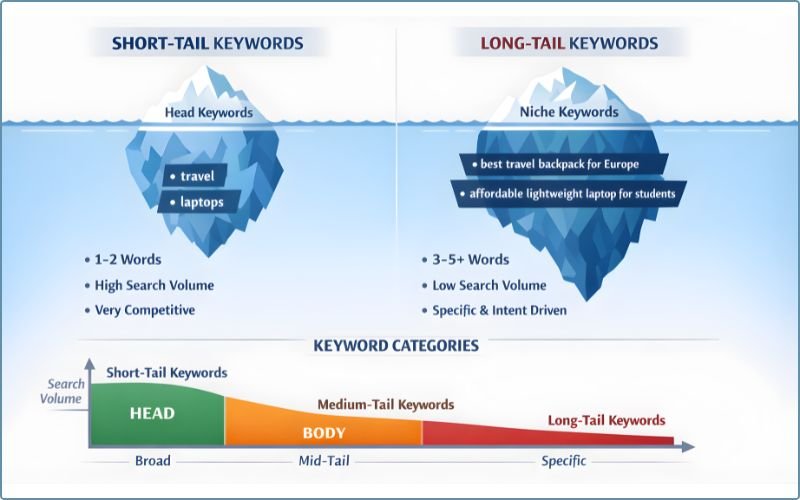
Keywords come in different flavours. Understanding the categories helps you think strategically about what to target.
Length-Based Keywords
Short-tail keywords: 1-2 words
- Examples: “coffee machine,” “blog software,” “SEO tools”
- Search volume: Very high (10,000+ monthly searches)
- Competition: Very high (large brands dominate)
- Best for: Established sites with authority
Long-tail keywords: 3+ words (usually 4-7 words)
- Examples: “best budget coffee machine for offices,” “easiest blog software for beginners,” “cheapest SEO tools for startups”
- Search volume: Lower (100-2,000 monthly searches)
- Competition: Much lower (easier to rank)
- Best for: New sites, quick wins, high conversion
Reality check: New sites should focus 100% on long-tail keywords. They’re the fastest path to your first rankings.
Authority-Based Keywords
Branded keywords:
Contain your business name or product name
- Examples: “ShareSnappy content planner,” “HubSpot CRM,” “Semrush SEO tool”
- Who searches: People who already know about your brand
- Goal: Capture existing audience, beat competitors’ branded searches
Non-branded keywords:
Don’t contain your business name
- Examples: “best content planner,” “best SEO tool,” “content calendar template”
- Who searches: People looking for solutions (don’t know your brand yet)
- Goal: Attract a new audience, build awareness
Strategy: Early on, focus on non-branded keywords to attract people who don’t know you exist. Once you have traffic and authority, optimize for branded keywords (your own brand + competitors’ brands).
Advertisment
Intent-Based Keywords (The Four Core Types)
This is the most important distinction. Google cares deeply about search intent, what people searching actually want.
Informational intent:
The person wants to learn something
- Examples: “how to start a blog,” “what is affiliate marketing,” “why is keyword research important”
- User goal: Knowledge, education, understanding
- Content type needed: Blog posts, guides, tutorials, how-tos, explainers
- Monetization difficulty: High (reader is in learning mode, not buying mode)
Commercial intent:
The person is researching before buying
- Examples: “best blog software 2026,” “content planner vs editorial calendar,” “cheapest email marketing tool”
- User goal: Compare options, find the best solution
- Content type needed: Comparison posts, reviews, roundup articles, best-of lists
- Monetization difficulty: Medium (reader is interested, deciding between options)
Transactional intent:
The person is ready to buy right now
- Examples: “buy blog software,” “HubSpot pricing,” “free trial Semrush,” “sign up for email marketing”
- User goal: Complete a transaction, sign up, and make a purchase
- Content type needed: Product pages, pricing pages, sign-up guides, tutorials, landing pages
- Monetization difficulty: Low (reader has intent to convert)
Navigational intent:
The person is looking for a specific website or page
- Examples: “Facebook login,” “Google Analytics,” “Moz Domain Authority tool“
- User goal: Navigate to a specific site
- Content type needed: Usually your branded pages (not targetable externally)
Critical point: Your content type must match the search intent. Write a blog post for a transactional keyword, and it won’t rank. Write a comparison article for an informational keyword, and you’ll rank, but won’t convert.
We’ll dive deeper into this later. Just know: intent alignment is everything.
Modifier-Based Keywords
Keywords often contain modifiers—words that change the meaning:
Comparison modifiers:
“vs,” “alternative to,” “compared to”
- Examples: “HubSpot vs Semrush,” “Gmail alternative,” “Shopify compared to WooCommerce”
- Intent: Comparison shopping, looking for alternatives
Action modifiers:
“best,” “cheapest,” “how to,” “DIY,” “tutorial”
- Examples: “best blog platform,” “cheapest hosting,” “how to write a blog post,” “DIY SEO audit”
- Intent: Action-oriented, looking for solutions or instructions
Review modifiers:
“review,” “guide,” “ultimate,” “complete,” “in-depth”
- Examples: “HubSpot review,” “ultimate SEO guide,” “complete content marketing playbook”
- Intent: Deep information, comprehensive coverage, deciding between options
These modifiers shift search volume and competition. “Blog software” is brutal. “Best blog software for beginners” is much easier to rank for in Google.
Key Metrics Beginners Must Understand
When you research keywords, you’re going to see numbers. Here’s what they mean.
Search Volume
Search volume is the average monthly number of searches for a given keyword.
Example: “best blog software” has 12,100 monthly search volume. That means roughly 12,100 people per month type that phrase into Google.
Why it matters: More searches = more potential traffic if you rank #1.
Source confusion: Google Keyword Planner and other tools get search volume from different sources. Google’s keyword data is official but often grouped/ranged. Clickstream data (from browser extensions) is more detailed but may not be 100% accurate. Use both, trust neither completely.
Beginner guideline: Aim for 50+ monthly searches minimum. 100+ is better. But don’t ignore 50-100 keywords; they add up.
Keyword Difficulty / SEO Difficulty
This is the estimated difficulty for the first page ranking of a keyword on search engines like Google (0-100 scale).
- 0-20: Easy (you can probably rank with decent content)
- 20-40: Medium-easy (possible for new sites with good content)
- 40-60: Medium (requires solid content + some backlinks)
- 60-80: Hard (large sites, established authority needed)
- 80+: Very hard (major brands, news sites, established players dominate)
Why it matters: You need to know if you can realistically compete.
What creates difficulty: Mostly backlinks. If the top 3 results have 10,000 backlinks each, it’s hard to beat them. If the top 3 results have 5 backlinks each (small blogs), it’s easy.
Beginner guideline: Target specific keywords with difficulty levels 0-30 initially. Aim for 20-40 difficulty as you build authority. Only go 40+ once you have multiple rankings and proven SEO success.
Cost-Per-Click (CPC)
This is the average cost advertisers pay for clicks on Google Ads for this keyword.
Example: “best email marketing software” has a CPC of $15. That means advertisers pay an average of $15 per click.
Why it matters: High-CPC keywords often indicate strong buyer intent. If people are willing to pay $15 per click for this keyword, it’s probably commercial. Low CPC keywords are usually informational (learning, not buying).
As a signal: Use CPC as a hint about keyword profitability, not gospel truth.
Click-Through Rate (CTR) Potential
Not all keywords have equal click potential. Some SERP features steal clicks.
Featured snippets (Google’s answer box at the top) often reduce clicks to the #1 organic result because people get their answer from the snippet itself. You still want the snippet, but know your CTR will be lower.
Local packs (maps with 3 businesses) steal local query clicks. “Coffee shops near me” shows a map. Organic results get fewer clicks.
Some keywords have 50%+ CTR (people click through to organic results frequently). Others have only 5% CTR (SERP features satisfy most people).
This matters for planning. A keyword with 1,000 monthly searches but heavy SERP features might bring fewer clicks than a keyword with 500 monthly searches and light SERP features.
We’ll address this in the SERPs analysis section (spoiler: you Google the keyword and look).
Beginner Misconceptions About Keywords
Let’s bust some myths right now.
Myth #1: “Higher search volume is always better”
False. High-volume keywords are harder to rank for. They often have low intent (generic searchers), lower conversion rates, and massive competition. A 10,000 search volume keyword with 80% difficulty is worse than a 200 search volume keyword with 15% difficulty.
Focus on volume + difficulty + relevance together (we’ll call this the Tripod Rule).
Myth #2: “I should rank for everything in my niche”
False. Try to rank for everything, and you’ll rank for nothing. Pick 3-5 primary keywords and own them. That’s 10x better than spreading thin across 100 keywords.
Myth #3: “Keyword density is all that matters”
This was true in 2005. It’s not 2005. Google’s RankBrain and Hummingbird updates changed everything. Natural language and relevance matter infinitely more than forcing a keyword into 2% of your text.
Myth #4: “My site authority doesn’t matter”
This is huge. A brand-new website cannot outrank Forbes on “best blog tools” no matter how good your content is. Authority matters. A lot. Pick keywords where you can compete based on your current authority level.
Myth #5: “Seasonal keywords aren’t worth it”
False. Seasonal keywords have huge intent during their season. “Holiday gift ideas” has 10x the search volume in November than in March. “Black Friday deals” are worth a massive effort in October-November. Don’t ignore the seasonality plan for it.
The Keyword Tripod Rule: Your Decision-Making Framework
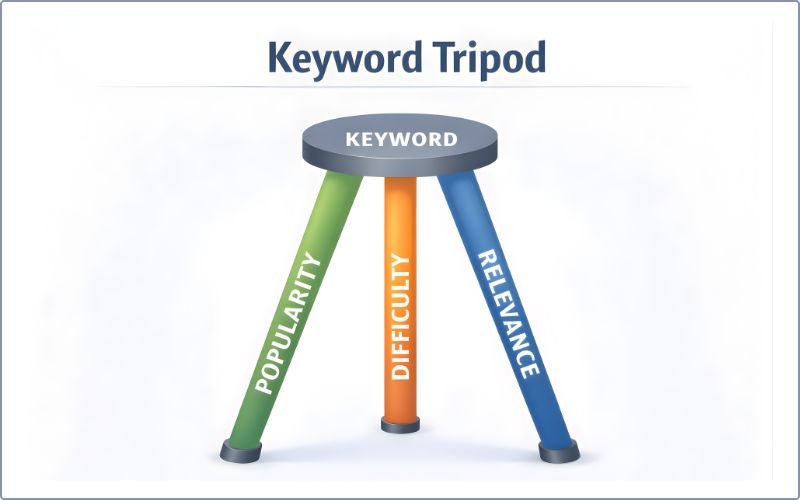
Every keyword decision you make should rest on a simple framework: the Keyword Tripod Rule.
Imagine a tripod. It stands on three legs. If one leg is weak, the whole tripod collapses.
Keywords are the same way. They need three strong legs: Popularity, Difficulty, and Relevance.
The Three Legs of the Tripod
Popularity (Search Volume)
Leg 1: Popularity
The question: Do enough people search for this keyword to make it worth targeting?
Why it matters: No searches = no traffic. Even if you rank #1, zero searches means zero visitors.
Beginner guideline: Aim for 50+ monthly searches minimum. Prefer 100+. Anything below 50 is usually too risky for beginners.
But here’s the nuance: One article targeting a keyword with 100 searches will likely rank for 10-15 related keywords too. So your total traffic from one article might be 200-300 monthly visitors, even though the primary keyword has 100 searches.
Don’t be obsessive about high volume. A 200 search/month keyword you can rank in 4 weeks beats a 10,000 search/month keyword you can’t rank for in a year.
Difficulty (Competition)
Leg 2: Difficulty
The question: Can YOUR site realistically rank on the first page for this keyword?
Why it matters: You can’t outrank Forbes on day 1. You need to pick keywords where you can compete based on your current authority.
Beginner guideline:
- 0-20 difficulty: Easy. Go for it.
- 20-40 difficulty: Medium. Possible with good content.
- 40-60 difficulty: Hard. Maybe wait 6 months.
- 60+: Very hard. Focus elsewhere.
What to check: Google the keyword. Look at the top 3 results. Are they big brands (hard to beat) or small blogs (you can compete)? Are they 5 years old with authority or 2 months old with no backlinks?
Difficulty scores are estimates. Your gut check matters too.
Relevance (Intent Match)
Leg 3: Relevance
The question: Does this keyword actually match the piece of content I’m planning to write?
Why it matters: You might target “buy email marketing software” (transactional), but your article is a comparison guide (commercial). Intent mismatch = no rankings.
How to check:
- Google the keyword you want
- Look at the top 5 results
- Are they product pages? Comparison posts? Blog guides? Videos?
- Does your planned content match?
If you’re writing a blog post and all the top results are product pages, the keyword doesn’t match your content type. Skip it or write a product review instead.
How to Visualize & Use the Tripod Rule
Green light, yellow light, red light:
Green Light (Target It):
- All 3 legs are strong
- Good volume (100+ monthly searches)
- Low-medium difficulty (0-40)
- Perfect intent match (your content type matches SERP results)
- Example: “How to write a blog post” for a beginner blogger (1,500 searches, 25 difficulty, all top results are blogs)
Yellow Light (Decide Strategically):
- 2 legs strong, 1 weak
- Good volume but high difficulty → Target later when you have more authority
- Low volume but low difficulty and perfect relevance → Target it (quick win)
- Great volume and low difficulty, but shaky intent match → Adjust your content angle or skip it
Red Light (Skip It):
- Only 1 leg is strong
- High volume but also high difficulty and intent mismatch → Not worth it
- Low volume, medium difficulty, okay intent → Too risky
This framework makes decision-making simple. Every keyword gets a color. Green keywords go in your “target now” list. Yellow keywords get strategic consideration. Red keywords go in the “skip” pile.
Keyword Research Strategy: Start to Finish (Six-Step Process)
Now let’s get practical. Here’s the exact process to research keywords like a pro.
Step One: Define Your Goals, Audience & Business Context
Before you search for a single keyword, get clear on three things.
Clarify What Success Looks Like
What do you want from keyword research?
Are you trying to:
- Get more traffic? (Target high-volume keywords)
- Generate leads? (Target commercial/transactional keywords with high intent)
- Make sales? (Target transactional keywords)
- Build authority? (Target informational keywords to establish expertise)
- Grow email subscribers? (Target informational keywords for lead magnets)
Your goal determines the type of keyword you target.
Example: An affiliate marketer should target commercial keywords (“best email marketing software,” “HubSpot vs Semrush”). A thought leader should target informational keywords (“email marketing strategy,” “why email works for B2B”).
Define Your Target Audience
The biggest mistake beginners make: Using their own language instead of their audience’s language.
Ask yourself:
- Who are they? (entrepreneurs? students? homeowners? SaaS managers?)
- What problems do they have? (too much manual work? wasting money? frustrated?)
- What language do THEY use? (not your internal company jargon—their real words)
Real example: A company called their ice cream “vacation cottages,” thinking it was unique. But customers searched for “vacation homes” and “holiday rentals.” Mismatch = nobody found them.
To find your audience’s language:
- Listen to customer support conversations
- Read reviews on competitor websites
- Browse Reddit communities in your niche
- Check Facebook groups where your audience hangs out
- Read Quora questions in your space
Your audience’s language is everything. Use it for keyword search.
Assess Your Current Authority
This is critical. New sites play a different game than established sites ranking for a keyword.
New site (0-6 months old):
- Almost zero authority
- Can’t compete on competitive keywords
- Strategy: Target low-difficulty keywords (0-20) to build authority fast
Growing site (6-18 months old, a few rankings):
- Some authority building
- Can target medium-difficulty keywords (20-50)
- Strategy: Build topic clusters, establish topical authority
Established site (18+ months, multiple rankings, backlinks):
- Real authority
- Can target competitive keywords (40-60)
- Strategy: Go for high-volume head terms and dominate
Know where you are. Pick keywords you can realistically win.
Step Two: Brainstorm Seed Keywords (Five to Ten Starting Points)
Seed keywords are your starting point. You expand from here.
Think of 5-10 broad keywords related to your business:
For bloggers: “how to create a blog post,” “content planning,” “blog ideas,” “content calendar”
For ecommerce: “coffee machines,” “running shoes,” “winter coats,” “home office desks”
For SaaS: “email marketing software,” “project management tools,” “SEO tools,” “CRM software”
For affiliate marketers: “best productivity apps,” “budget laptops,” “fitness trackers,” “travel backpacks”
For local services: “plumber near me,” “accountant in [city],” “marketing agency [city],” “web designer [city]”
These don’t have to be perfect. You’re just creating a launching pad. Next step, you’ll expand them into 50-100+ keywords.
Step Three: Expand Your List of Keywords (From Five to One Hundred Plus)
This is where the magic happens. One keyword becomes dozens.
Method One: Use Google Suggestions (Free)
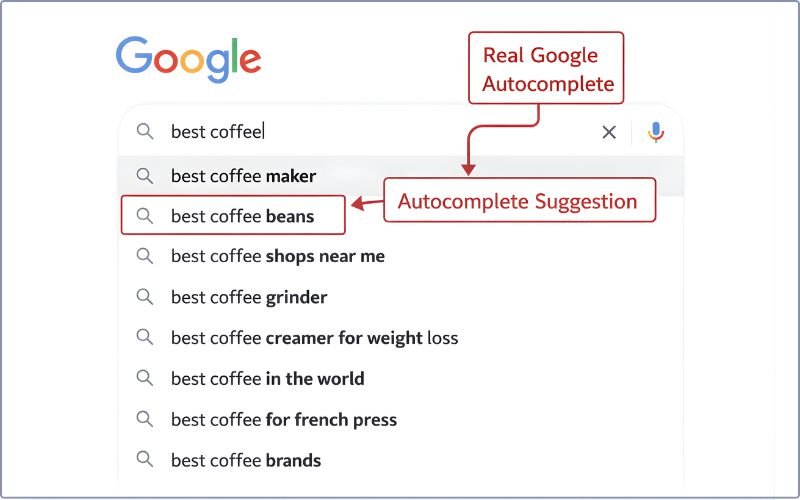
Google shows you real search behavior. For free keyword research.
- Type your seed keyword into the Google search bar
- Notice the dropdown suggestions (autocomplete) → These are real searches
- Scroll to the bottom of Google results
- Look for “Related searches” section → More real keywords
- Scroll up to the “People also ask” section → Questions people ask
Record everything relevant. That’s your expanded list of keywords.
Example: Search “content marketing”
- Autocomplete suggests: “content marketing strategy,” “content marketing tools,” “content marketing agency,” “content marketing examples”
- Related searches: “digital marketing,” “content marketing plan,” “social media marketing,” “inbound marketing”
- People Also Ask: “What is content marketing?”, “How much does content marketing cost?”, “What are content marketing strategies?”
There are many keyword suggestions you could target.
Sponsored Affiliate Ad

All IN ONE SEO Tool for Keywords, Competitors, & AI Analysis
Method Two: Use Keyword Research Tools (Recommended)
Free tools give you more data faster.
Free options:
- Google Keyword Planner (needs Google Ads account): Official Google data, search volume ranges
- AnswerThePublic (free version): Shows question-based keywords people ask
- Ubersuggest (free tier): Keyword suggestions + volume estimates
- Google Trends: Seasonality, interest over time, trending keywords
Paid options (worth it if monetizing):
- Ahrefs Keyword Explorer ($99-999/month): Industry-leading, comprehensive
- Semrush ($99-999/month): Powerful, competitive analysis
- Mangools KWFinder ($49/month): Affordable, beginner-friendly
- SE Ranking ($55-150/month): All-in-one platform
Tools give you: volume, difficulty, SERP analysis, and thousands of keyword ideas in seconds.
Free tools get you 80% there. Paid tools get you to 100%.
Method Three: Mine Community Sources (Free, Underrated)
Real people use real language. Find where they gather online.
Reddit (reddit.com):
- Search r/[your_niche]
- Read discussions, questions, and comments
- Note the language people use naturally
- Example: “Best budget camera” or “affordable DSLR”?
Quora (quora.com):
- Search your topic
- See real questions people ask
- See what remains unanswered
Amazon/eBay reviews:
- Search product in your category
- Read Q&A section
- People ask real questions: “Does this work for beginners?” “Is this compatible with…?”
Facebook Groups:
- Join groups in your niche
- Monitor discussions
- See what problems people mention most
YouTube search bar:
- Type seed keyword
- Autocomplete shows popular video topics
- Expand from there
These sources show your audience’s natural language. Invaluable.
Method Four: Structural Exploration (Wikipedia)
For broad topics, Wikipedia is a goldmine.
Example: “Fitness training”
- Go to the Wikipedia article
- Scroll to the “Contents” section
- You see: Training, Cardio training, Strength training, HIIT, Aerobic exercise, etc.
- Each subtopic is a potential keyword
- Drill down: “HIIT training” → subtopics: “HIIT for beginners,” “HIIT for weight loss,” etc.
Wikipedia shows how a topic breaks into subtopics. Each subtopic becomes a keyword.
Step Four: Analyze Each Keyword (Apply the Tripod Rule)
You now have 50-200+ keyword ideas. Which ones matter?
Apply the Tripod Rule to each.
Evaluate Popularity (Search Volume)
For each keyword:
- Check the search volume (use a tool or Google Trends)
- Is it 50+ monthly searches? Good.
- Use Google Trends to check the trend (growing, stable, declining?)
- Is it seasonal? (spikes in certain months?)
Example: “gift ideas” has 50,000 monthly searches—but mostly in November-December. In June, it’s only 5,000. You need to know this.
Evaluate Difficulty (Competition)
For each keyword:
- Check the difficulty score (0-100)
- For new sites, aim for 0-30 difficulty
- Google the keyword
- Look at the top 3 results: Are they major brands or small blogs?
- Can you realistically beat them?
If all top 3 results are from Forbes, Amazon, and CNN, skip it. If they’re from blogs with a domain authority of 25-40, you can compete.
Evaluate Relevance (Intent Match)
For each keyword:
- Google it
- Look at the top 5-10 results
- What content type ranks?
- Blog posts?
- Product pages?
- Comparisons?
- Videos?
- Guides?
- Does your planned content match this format?
If you’re writing a blog post and all the top results are product pages, the intent doesn’t match. Either:
- Skip the keyword
- Change your content type to match (write a product review instead)
- Find a long-tail variant that better matches the blog posts you need to create.
Red Flags to Watch For
Some keywords aren’t worth your time:
- High difficulty + new site: Skip. Revisit in 6+ months.
- Zero search volume: Nobody searches. Skip.
- Highly seasonal only: Only valuable for 1-2 months per year. Decide if worth it.
- Top results are Fortune 500 companies: Probably too competitive. Find easier alternatives.
- SERP dominated by featured snippets/news: Lower CTR. Lower payoff. Maybe skip.
Step Five: Organize, Prioritize & Create Your Keyword List
You’ve analyzed 50-200 keywords. Now organize them into a spreadsheet.
Create Your Spreadsheet
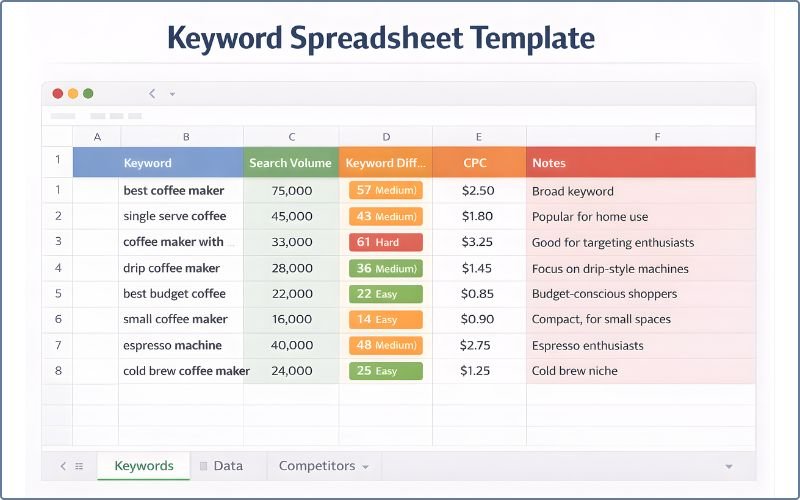
Use Google Sheets or Excel. Create columns:
- Keyword: The exact phrase
- Search Volume: Monthly estimate
- Difficulty: 0-100 score
- Intent Type: Informational / Commercial / Transactional / Navigational
- Content Type: Blog post / Product page / Comparison / Guide / Video
- Target Audience Stage: Awareness / Consideration / Decision
- Notes: Any observations, red flags, opportunities
Example row:
| Keyword | Volume | Difficulty | Intent | Content Type | Stage | Notes |
|---|---|---|---|---|---|---|
| How to start affiliate marketing | 450 | 18 | Informational | Blog | Awareness | Very competitive but low difficulty. Green light. |
| Best affiliate programs for beginners | 320 | 25 | Commercial | Comparison/Review | Consideration | Perfect beginner angle. Good match. |
| Affiliate marketing course review | 180 | 15 | Transactional | Product Review | Decision | Small volume but very low difficulty. Quick win. |
| Affiliate marketing | 8,100 | 62 | Informational | Guide | Awareness | Too hard for new site. Target in 12+ months. |
This spreadsheet becomes your source of a keyword strategy document.
Prioritization Strategy
Not all keywords are created equal. Prioritize by impact and feasibility.
Priority 1 (Quick Wins): Medium volume (100-500/month) + Low difficulty (0-20) + Good intent match
- These rank fastest
- Build momentum quickly
- Establish authority fast
- Start here first, even if traffic is smaller
Priority 2 (Medium-term): Medium-high volume (500-2,000/month) + Medium difficulty (20-50) + Good intent
- Target after you’ve ranked for 5-10 Priority 1 keywords
- Build on your growing authority
Priority 3 (Long-term): High volume (2,000+/month) + Higher difficulty (50+)
- Go for these once you have real authority (6+ months, multiple ranking keywords)
- Higher payoff but higher effort
Step Six: Map Keywords to Content (Without Cannibalization)
You have your highly relevant keywords. Now assign them to pages.
Key principle: One primary keyword per page. 5-15 supporting keywords on that same page.
Primary Keyword vs. Supporting Keywords
Primary keyword (focus keyword) goes in:
- Title tag (H1)
- URL slug
- First 100 words
- At least one H2 subheading
- Meta description
Supporting keywords: Natural mentions throughout
- Related terms (synonyms, variations)
- Related long-tail keywords
- Semantically related words
Example:
- Primary: “How to start affiliate marketing”
- Supporting: “Beginner affiliate marketing tips,” “Make money with affiliate links,” “Affiliate marketing for bloggers,” “Choose affiliate programs”
The article targets the focus keyword but naturally ranks for all supporting keywords too.
How to Avoid Keyword Cannibalization
Cannibalization happens when you optimize the same (or very similar) keyword on multiple pages. Google gets confused. Neither page ranks well.
Example of cannibalization:
- Page 1: “Best affiliate programs for beginners”
- Page 2: “Top affiliate programs for new marketers”
- Page 3: “Affiliate programs beginners should join”
All three target essentially the same keyword. Google doesn’t know which one to rank. Result: None of them ranks well.
Solution: Pick ONE primary keyword per page. Put very similar keywords on the same page as supporting keywords, not on separate pages.
When to Create New Page vs. Expand Existing
Create a new page when:
- The keyword is very different in topic
- The keyword targets a different audience stage (awareness vs. decision)
- The keyword has high enough volume to deserve its own article
Expand an existing page when:
- The keyword is a subtopic of an existing page
- The keyword is a variation of the primary keyword
- It’s the same general topic
Example:
- New page: “How to start affiliate marketing” (primary post)
- New page: “Best affiliate programs for beginners” (different topic: selection, not how-to)
- Expand existing: Add H2 section “How to choose affiliate programs” to the first post (subtopic)
Step Three: Identify SERP Features & Click Potential
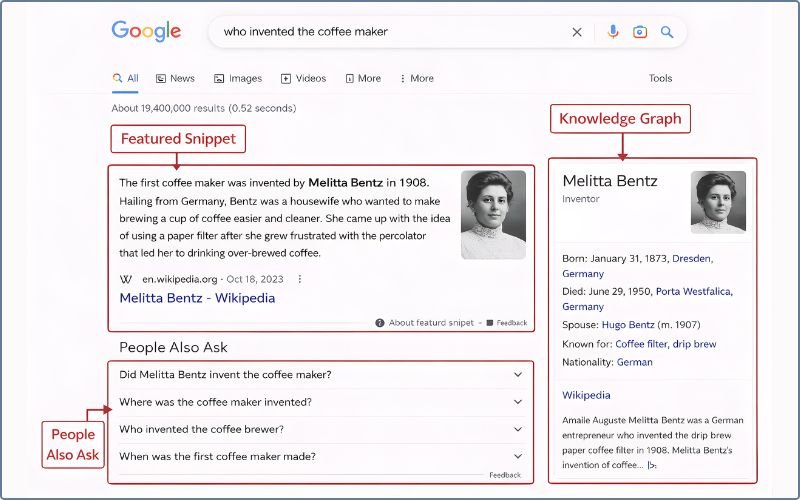
Some SERP features steal clicks from organic results. Know which ones.
Featured Snippet (Position Zero)
Google shows a summary of an answer at the top of the page.
Impact: Featured snippets reduce clicks to the #1 organic result because many people get their answer from the snippet itself.
For you: You want the featured snippet (visibility), but know your CTR will be lower. If the SERP has a strong featured snippet that dominates, the keyword might have lower click potential
Before You Write: The Five-Step SERP Analysis Framework (Critical!)
Here’s the mistake 90% of beginners make: They pick a keyword, write the content, and publish it.
Then they wonder why it doesn’t rank.
The reason: They never checked what Google already shows for that keyword.
SERP analysis is the antidote. It’s simple: Before you write, Google the keyword. Analyze what’s ranking. Then write something better.
This single step will improve your rankings more than anything else in this ultimate guide.
What Is SERP Analysis?
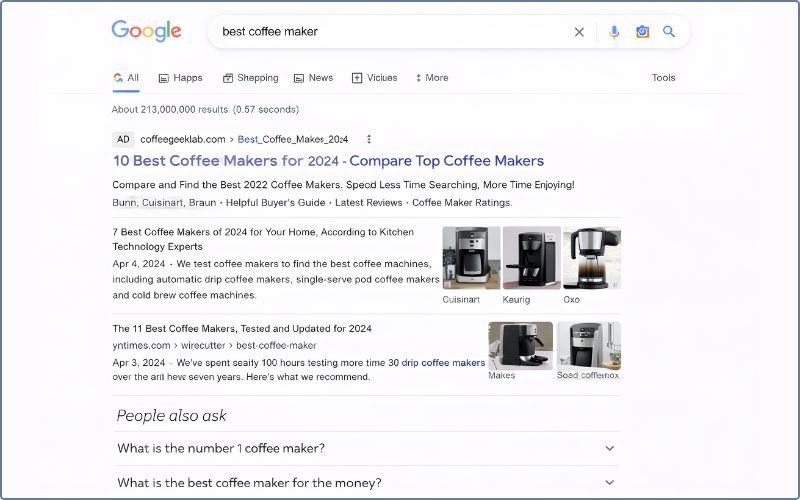
SERP = Search Engine Results Page. It’s the page Google shows when someone searches your keyword.
SERP analysis means: Looking at that page and understanding:
- What type of content does Google want (blogs? product pages? videos?)
- Whether you can compete (are the top results from small sites or Fortune 500?)
- What angle is missing (what could make your content better?)
- Whether the CTR potential is good (do SERP features steal clicks?)
This takes 5-10 minutes per keyword. Do it before writing. It saves 20 hours of wasted writing.
Step One: Check the Content Type(s) That Rank
Google shows the content type it thinks best answers the search query.
Look at the top 3 results:
Are they mostly:
- Blog posts? (long-form guides, how-tos, tutorials) → Write a blog post
- Product pages? (ecommerce listings, product reviews) → Write a product review or shopping guide
- Landing pages? (opt-in pages, sign-up forms) → Write a conversion-focused page
- Comparison pages? (X vs Y, best-of lists) → Write a comparison article
- Videos? (YouTube embeds, video content) → Make video content
- Local/Maps results? (business listings) → Not targetable unless local
- News articles? (current events, breaking news) → Not relevant for evergreen content
Google is telling you what format it wants. Match it, or you won’t rank.
Example: Search “best budget coffee maker 2026”
- Top 3 results: All blog posts with product roundups
- Google is saying: “For this keyword, I want roundup articles”
- Your move: Write a roundup article (not a single product review, not a buying guide, but a roundup)
If you write a single product review instead, you won’t match the SERP format. You probably won’t rank.
Step Two: Assess If You Can Compete (Authority Check)
Look at the site’s ranking for your keyword. Can you realistically beat them?
Ask yourself:
- Are they big brands? (CNN.com, Forbes.com, Amazon.com) = Very hard for the new site. Skip.
- Are they established blogs? (5+ years old, professional design, lots of content) = Medium difficulty. Possible with great content.
- Are they small/new sites? (Looks like a personal blog, 1-2 years old) = You can compete.
- What’s the content quality? (Thin and generic? Mediocre? Excellent?) = If mediocre, you can beat it.
Gut check: Would your site look at home alongside these top 3 results?
If your site is a brand-new tech blog and the top 3 results are all from established publications, the answer is no. Skip this keyword. Find easier ones.
If the top 3 results are from medium-authority blogs similar to yours, the answer is probably yes. You can compete.
Real example: “How to write a blog post”
- Top results: HubSpot, Yoast, Neil Patel (all massive, established)
- New blog = Cannot compete
- Better alternative: “How to write your first blog post” (less competitive) al.
People Also Ask
Google shows a collapsible section of related questions.
Impact: People click these questions instead of your organic result. Lower CTR.
Local Pack
For local keywords, Google shows a map with 3 businesses.
Impact: If someone searches “coffee shops near me,” the map steals the click. Organic results get fewer clicks.
Knowledge Graph
A sidebar with structured information (birth date of a person, stats about a brand, etc.).
Impact: Can reduce organic CTR by providing answers without clicking.
Google Ads
Paid ads appear above organic results.
Impact: Push organic results down. Reduce CTR. Each ad pushes you further down.
Shopping Results
For product-focused keywords, Google often shows a product carousel.
Impact: Ecommerce searches are handled separately, which reduces clicks to blog reviews.
Check the SERP
When you Google your keyword, count:
- How many ads are shown?
- Is there a featured snippet?
- Is there a People Also Ask section?
- Is there a knowledge graph?
Many features = Lower CTR opportunity = Maybe skip
Few features = Better organic CTR = Good keyword
Example: “Best running shoes” has 10 ads + featured snippet + shopping carousel. Very competitive for organic. “Best running shoes for beginners” has 2 ads + no snippet. Much better.
Step Four: Reverse-Engineer What Top Results Are Doing
Keyword gap analysis is another powerful way to find new keyword opportunities. Find the gap where you can win.
For each top 3 result, analyze:
- Article structure: How many H2s? What sections? How long?
- Angle/hook: Does it focus on benefits? Problems? Comparisons? Process?
- Targeted Keywords: Read the intro and H2s. What keywords are they optimizing for?
- What is missing: What query do they NOT answer well? What would make your article better?
Example: “Best affiliate programs for beginners”
- Result #1: Generic list of 15 programs, no beginner focus
- Result #2: Outdated (2023), missing new affiliate networks
- Result #3: Beginner-focused but too short (only 1500 words)
- Gap you found: Beginner-focused (like #3), up-to-date (not like #2), comprehensive (not like #1)
- Your angle: “Best Affiliate Programs for Beginners 2026: Complete Comparison of 10 Networks”
Now your article has a clear competitive advantage.
Step Five: Final Decision (Should You Target This Keyword?)
Use this decision tree:
Does the content type match what I plan to write?
- NO → Do not target. Mismatched intent.
- YES → Continue.
Can I realistically compete based on authority?
- NO → High competition right now. Wait 6+ months.
- YES → Continue.
Are SERP features manageable (good CTR potential)?
- NO → Still targetable, but you know CTR will be limited. Decide if worth it.
- YES → Great. Continue.
Does the keyword pass the Tripod Rule (volume, difficulty, relevance)?
- NO → Skip it.
- YES → TARGET THIS KEYWORD. Write the article.
Understanding Search Intent Deeply (And How It Affects Your Content Strategy)
We touched on intent earlier. Let’s go deeper. This is critical.
Search intent isn’t just “informational” vs. “commercial” vs. “transactional.” It also maps to the buyer’s journey.
Beyond the Four Intent Types: Matching to Buyer Journey
Where is the person in their buying/learning journey?
Awareness Stage
“What is affiliate marketing?” “How does SEO work?” “What’s the difference between email marketing and SMS?”
User goal: Understand, learn, become aware
Content: Educational guides, definitions, explainers, and broad overviews
Monetization difficulty: HIGH
The person is learning. They’re not ready to buy. They’re not comparing solutions. They just want information.
Your strategy: Establish authority. Build trust. Create value.
Example blog topics for awareness stage: “What is keyword research?” “How does Google’s algorithm work?” “Why is content marketing important?”
Consideration Stage
“Best affiliate programs,” “HubSpot vs Semrush,” “Cheapest email marketing tools”
User goal: Evaluate, compare, and decide between solutions
Content: Comparisons, reviews, roundup articles, case studies, best-of lists
Monetization difficulty: MEDIUM
The person knows what they need. Now they’re comparing solutions. They have the intent to decide.
Your strategy: Help them make the best choice (preferably your product/program). Show comparisons. Explain trade-offs.
Example blog topics for consideration stage: “Best project management tools for remote teams,” “Mailchimp vs ConvertKit for email marketing,” “Top 5 affiliate networks 2026”
Decision Stage
“Join HubSpot,” “Free trial Semrush,” “How to get approved for CJ Affiliate”
User goal: Take action, sign up, make a purchase
Content: Sign-up guides, tutorials, application tips, pricing pages, and landing pages
Monetization difficulty: LOW
The person has decided. Now they just need the friction removed. They’re ready to convert.
Your strategy: Make it easy. Remove barriers. Provide step-by-step instructions.
Example blog topics for decision stage: “How to sign up for ShareSnappy in 5 minutes,” “Semrush pricing explained,” “CJ Affiliate approval requirements”
Avoid Intent Mismatch
This is the #1 SEO mistake.
Scenario: You write a blog post for the keyword “buy email marketing software” (transactional intent).
Your article: “The 10 Best Email Marketing Software Platforms: A Comparison Guide” (2,500 words comparing tools)
What happened:
- People searching for “buy email marketing software” want to buy NOW.
- They don’t want to read a 2,500-word lengthy comparison.
- They click your result, read for 30 seconds, and bounce back to Google.
- Your bounce rate is 90%
- Google sees this and stops ranking you.
The fix: Check the SERP first. If people searching this keyword are clicking product pages or landing pages (not comparison blogs), write a landing page or product page instead. Match the intent.
Choosing the Right Keywords for Your Site’s Stage
Here’s a truth nobody tells beginners: The keywords you target depend on how old your site is.
A brand-new site playing by the same rules as an established site? You’ll lose every time.
Instead, play your stage. Pick keywords your site can realistically rank for.
Find Keywords for New Site (Zero to Three Months Old) Strategy
Your situation:
Google doesn’t know you exist. You have zero backlinks. Zero authority. Zero rankings. Google is still deciding if your site is even worth indexing.
Your keyword strategy:
Focus 100% on low-difficulty keywords. Aim specifically for 0-20 difficulty.
Forget the high-volume keywords for now. Forget the competitive ones. You need your first ranking. You need Google to see that you can rank. You need to build authority.
Target volume: 50-500 monthly searches. Don’t be afraid of “small” keywords. They compound.
Avoid: Any keyword where the top 3 results are major brands.
Example niche: Affiliate marketing blog (brand new, no authority)
- ✓ “How to make money with affiliate links” (350 vol, 20 difficulty)
- ✓ “Affiliate marketing for beginners” (280 vol, 22 difficulty)
- ✓ “Best affiliate programs for solopreneurs” (120 vol, 15 difficulty)
- ✗ “Affiliate marketing” (33,000 vol, 62 difficulty) = Way too hard
- ✗ “Make money online” (201,000 vol, 78 difficulty) = Impossible
Your goal: Get 5-10 rankings in 3-6 months. This builds authority fast.
Find Keywords for Growing Site (Three to Twelve Months Old) Strategy
Your situation:
You have a few rankings. You’re building authority. Google is paying attention. You’re proving you’re not a spam site.
Your keyword strategy:
Now you can attack on medium-difficulty keywords (0-40 difficulty).
Now build topic clusters: Create pillar pages and cluster content around them. This signals topical authority.
Target volume: 500-2,000 monthly searches.
Strategy: Connect your content. If you have a piece about “affiliate marketing for beginners,” create complementary pieces about “best affiliate programs,” “how to write affiliate reviews,” and “affiliate marketing tools.” Link them together.
Google sees you covering a topic comprehensively. You rank better.
Find Keywords for Established Site (Twelve Plus Months, Multiple Rankings) Strategy
Your situation:
You have real authority. Multiple rankings. Backlinks. Google trusts you.
Your keyword strategy:
Now you can go after the competitive head terms (40-60 difficulty).
You can target high-volume keywords (2,000+ monthly searches).
You can try to dominate your entire niche.
Target volume: 2,000+ monthly searches.
Your strategy: Attack the high-payoff keywords. You’ve built the authority. Use it.
Beginner Mistakes to Avoid (Common Failures)
Learn from others’ mistakes so you don’t repeat them.
Chasing High Volume Without Checking Competition
“This keyword has 10,000 monthly searches! I’m targeting it!”
Then you write 2,000 words. You optimize perfectly. You wait 8 weeks.
No rankings. Top results are HubSpot, Neil Patel, and Forbes. You never had a chance.
The mistake: Chasing volume without checking difficulty.
The fix: Always filter for difficulty FIRST. High volume + high difficulty = not worth it for new sites.
Ignoring Search Intent (Biggest Failure)
Write a blog post for “buy email marketing software” (a transactional keyword).
People searching for this want to buy. They click a landing page or product review. Not your educational blog post.
Bounce rate: 95%. Rankings: Dead.
The mistake: Writing the wrong content type for the keyword.
The fix: SERP analysis FIRST. Check what format ranks. Match that format.
Targeting Only Head Terms
You want to rank for “content marketing,” “email marketing,” and “digital marketing” (all with 50,000+ monthly searches and 70+ difficulty).
Eight months later: Zero rankings. You give up.
The mistake: Impossible difficulty + high competition = predictable failure.
The fix: Start with long-tail keywords. Get 10 rankings at 100-500 monthly searches each. That’s 1,000-5,000 monthly traffic. Better than zero rankings at 10,000 searches.
Keyword Cannibalization
You create three blog posts:
- “Best email marketing software”
- “Top email marketing platforms”
- “Email software for small business”
All three target essentially the same keywords. Google doesn’t know which one to rank. Result: None ranks well.
The mistake: Not consolidating similar keywords onto one page.
The fix: One keyword per page. Put variations on the same page.
Not Doing SERP Analysis
You pick a keyword. You write the article. You publish it.
But you never checked what Google already shows.
Maybe the top results are all product pages. You wrote a blog post. Intent mismatch.
Maybe the top results are all reviews. You wrote a how-to guide. Format mismatch.
The mistake: Skipping SERP analysis = wasting 5-10 hours per article.
The fix: Google the keyword. Analyze top 5 results (takes 5 minutes). Match format, angle, depth. Then write.
Over-Optimizing / Keyword Stuffing
“Best blog software is the best software for blogging. If you want the best blog software…”
Reads like a robot wrote it. Google penalizes this.
The mistake: Forcefully using a keyword in every sentence.
The fix: Use your primary keyword naturally in:
- Title (H1)
- First 100 words
- One H2 subheading
- Meta description
Use synonyms and related terms for the rest.
Not Updating Your Keyword Research
You did keyword research in month 1, but never revisited it.
It’s now month 12. New competitors have entered. New keywords have emerged. Trends have shifted.
You’re using month 1 data.
The mistake: Treating keyword research like a one-time task.
The fix: Refresh every 6 months. Review quarterly. Monitor monthly in Google Search Console.
Underestimating Site Authority Difference
“My content is better than the #1 result. I’ll outrank them.”
But they have 5,000 backlinks. You have 0.
Welcome to reality.
The mistake: Overestimating content quality. Underestimating authority.
The fix: Pick keywords with a small difference in authority. Look at the domain authority (DA) scores of the top 3 results. If they’re all 60+, skip. If they’re 20-40, you can compete.
Beginner-Friendly Keyword Research Tools (Free & Paid)
You don’t need expensive tools to start. You don’t need zero tools either.
Here’s what actually works.
Best Free Tools for Starting Out:
Google Keyword Planner
Where: ads.google.com → Tools & Settings → Keyword Planner
What it does: Shows official Google search volume data and keyword ideas
Pros: Official Google data, free and built-in
Cons: Requires a Google Ads account, search volumes are often grouped/ranged (not exact), and you need to spend money in Ads to see exact numbers
Best for: Validating keyword volume before diving in
Google Trends
Where: trends.google.com
What it does: Shows keyword interest over time, seasonality, and spikes
Pros: Free, shows seasonality (crucial for planning), shows spikes and trends
Cons: Only shows relative interest (not absolute volume), limited keyword suggestions
Best for: Understanding seasonality (“gift ideas” spikes in November), ensuring your keyword isn’t declining
AnswerThePublic
Where: answerthepublic.com
What it does: Shows question-based keywords (what people actually ask)
Shows: “How to,” “What is,” “Why do,” “Can I,” “Where to” questions
Pros: Free version works, shows natural language people use, great for content ideas
Cons: Limited to free tier (shows some questions)
Best for: Finding question-based keywords, understanding audience pain points
Google Search Console
Where: search.google.com/search-console
What it does: Shows which keywords your site currently ranks for
Shows: Keywords you rank for, how many impressions, how many clicks, average position
Pros: Shows real data about your own site, opportunities and free
Cons: Only works after your site is indexed
Best for: Finding specific keywords you didn’t know you ranked for, identifying improvement opportunities
Community Sources (Free, Invaluable)
Reddit (reddit.com):
- Search r/[your niche]
- Read real discussions
- Note the natural language people use
Quora (quora.com):
- Searchfor your topic
- See real questions
- See what’s not been answered
Amazon/eBay reviews:
- Search product in your category
- Read Q and A. section
- People ask real pain-point questions
Facebook Groups:
- Join groups related to your niche
- Monitor discussions
- See recurring problems
YouTube search bar:
- Type seed keyword
- See autocomplete suggestions
- Autocomplete = popular video topics
These are goldmines of real user language.
When to Invest in Paid Tools
If your blog or business brings in any money, paid tools are worth it. Along with the keywords, you’ll also get valuable SEO metrics
Why? They save 10+ hours per month on keyword research. Even if a tool costs $50/month, and it saves you 10 hours of research, that’s $5/hour, a bargain if you make $15+/hour.
Best Beginner-Friendly Paid Tools
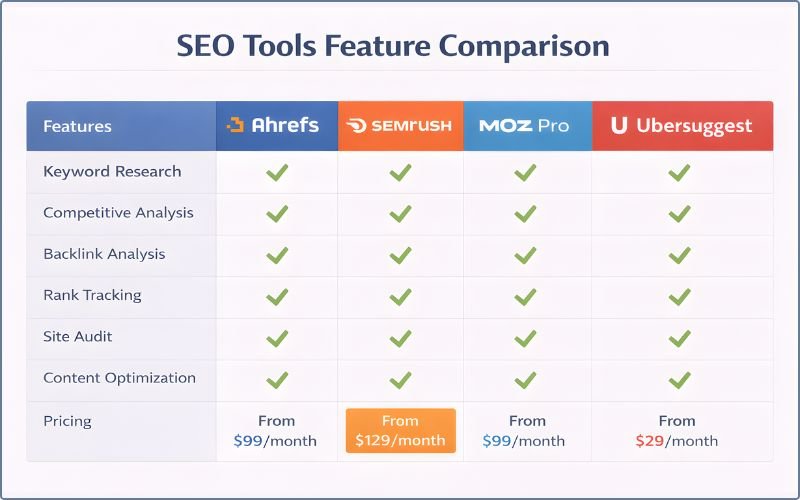
Ubersuggest ($12-120/month)
- Affordable
- Clean interface
- Great for beginners
- Decent keyword suggestions and difficulty scores
SE Ranking ($55-150/month)
- All-in-one platform (SEO, analytics, rank tracking)
- Good support
- Reasonable price
Moz ($49-599/month)
- Industry-leading keyword tool
- Most comprehensive
- Pricier but worth it if serious
- Best for advanced users
Semrush ($99-999/month)
- Similar to Ahrefs
- Powerful suite of tools
- Great competitive analysis
- Good for serious marketers
Mangools KWFinder ($49/month)
- Specifically designed for keyword research
- Very beginner-friendly
- Affordable
- Great UI
What Paid Tools Give You (Beyond Basics, Advanced SEO Metrics)
- Exact search volume (not ranges like Google)
- Keyword difficulty scores (estimated, but useful)
- SERP analysis (shows top ranking pages, their backlinks)
- Competitor keyword analysis (see what competitors rank for)
- Keyword suggestions at scale (hundreds to thousands per seed keyword)
- Rank tracking (monitor your rankings monthly or daily)
Tool Strategy
Month 1-2 (Free):
- Google Keyword Planner
- AnswerThePublic
- Google Trends
- Community sources (Reddit, Quora)
Month 3+ (If monetizing):
- Invest in one paid tool
- Ubersuggest or Mangools if budget-conscious
- Ahrefs or Semrush if you’re serious
Topic Clustering & Content Hubs (Bridge to Advanced Strategy)
Keyword research is step one. At this point, you likely have thousands of keyword ideas, but advanced marketers organize them into strategic clusters, a process called keyword clustering.
This section is a bridge to the next level.
Why Content Clusters Matter
Once you understand keyword research, you realize: Individual keywords don’t exist in isolation. They relate to each other.
“How to start affiliate marketing” relates to “best affiliate programs” and “how to write affiliate reviews.”
Instead of writing three random blog posts, write them as a connected cluster.
What is a content hub?
A content hub is a group of related content pieces organized strategically:
- Pillar page: Comprehensive guide on the broad topic (2,000-3,000 words)
- Cluster articles: Detailed articles on subtopics (1,500-2,500 words each)
- Internal linking: Pillar links to clusters. Clusters link to the pillar. Clusters link to each other.
How to Structure a Simple Content Hub
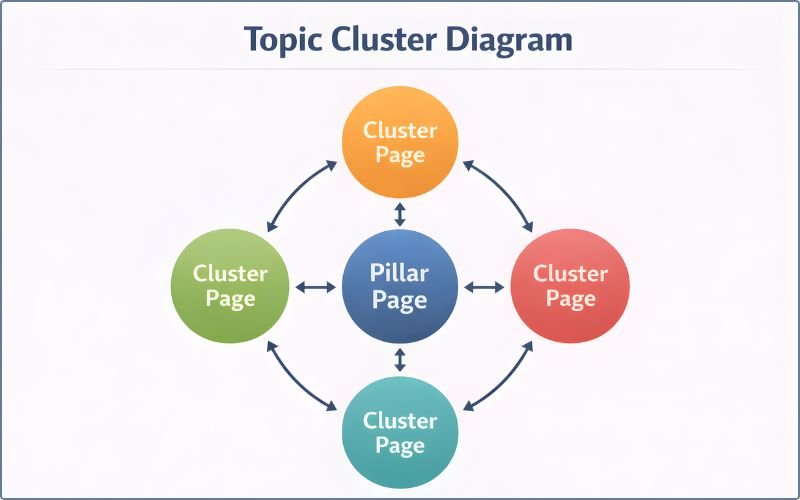
Example: Affiliate Marketing Hub
Pillar page: “The Complete Guide to Affiliate Marketing” (covers all basics, links to clusters)
Cluster articles:
- “How to Start Affiliate Marketing” (for absolute beginners)
- “Best Affiliate Programs 2026” (product selection, comparison)
- “How to Write Affiliate Reviews That Convert” (content creation)
- “Affiliate Marketing Tools You Need” (software and resources)
Internal linking:
- Pillar page links to all 4 clusters in the intro and relevant sections
- Each cluster links back to the pillar in the first paragraph
- Cluster 1 links to Cluster 2 when discussing “choosing programs”
- Cluster 2 links to Cluster 3 when discussing “writing reviews”
- Cluster 3 links to Cluster 4 when discussing “tools to use”
Google sees you covering affiliate marketing comprehensively. It boosts all rankings.
How This Affects Keyword Research
Now you’re not researching individual or specific keywords. You’re researching keyword clusters.
Example:
- Pillar keyword: “Affiliate marketing” (100-200 searches/month, low-medium difficulty)
- Cluster keyword 1: “How to start affiliate marketing” (400 searches)
- Cluster keyword 2: “Best affiliate programs for beginners” (300 searches)
- Cluster keyword 3: “How to write affiliate reviews” (250 searches)
- Cluster keyword 4: “Affiliate marketing tools” (200 searches)
Total traffic potential: 1,350 monthly searches if all rank
One cluster can bring more traffic than 10 individual blog posts.
This is the way you can scale your SEO efforts.
Real Example Walkthrough: Start to Finish
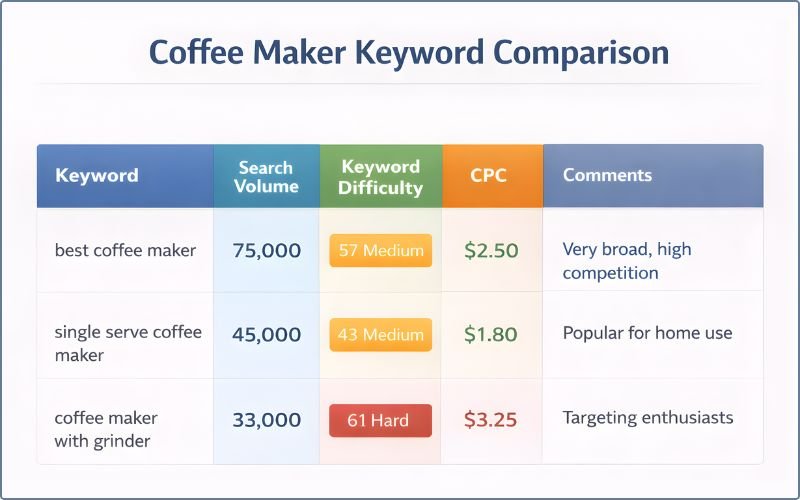
Theory is helpful, now let’s see how it works in practice.
Example Niche: “Best Budget Coffee Maker for Offices”
Let’s conduct comprehensive keyword research for a niche product blog post about office coffee machines.
Step One: Define Goals
Goal: Build an affiliate income blog recommending office coffee makers
Audience: Office managers, small business owners, and administrative assistants buying for their offices
Your authority: Brand new site (3 months old, zero rankings)
Step Two: Brainstorm Seeds
- “Best budget coffee maker”
- “Office coffee machine”
- “Small office coffee maker”
- “Cheap coffee maker that works”
- “Best coffee maker under 100 dollars”
Step Three: Expand Using Tools
Google autocomplete for “best budget coffee maker”:
- “best budget coffee maker for office”
- “best budget coffee maker reddit”
- “best budget coffee maker 2026”
- “best budget coffee maker canada”
Google autocomplete for “office coffee machine”:
- “office coffee machine rentals”
- “best office coffee machine”
- “office coffee machine commercial”
AnswerThePublic for “coffee maker”:
- “How often to clean a coffee maker?”
- “What is the best affordable coffee maker?”
- “Where to buy budget coffee makers?”
- “Is a cheap coffee maker worth buying?”
You now have ~30 keyword ideas from expansion.
Step Four: Analyze (Tripod Rule)
Let’s rate each keyword:
| Keyword | Volume | Diff | Intent | Tripod | Decision |
|---|---|---|---|---|---|
| “best budget coffee maker for office” | 320 | 28 | Commercial | 3/3 ✓ | Green: TARGET |
| “best cheap office coffee maker” | 180 | 22 | Commercial | 3/3 ✓ | Green: TARGET |
| “office coffee maker under $100” | 140 | 18 | Commercial | 3/3 ✓ | Green: TARGET |
| “small office coffee machine” | 95 | 20 | Commercial | 3/3 ✓ | Green: TARGET |
| “How often to clean coffee maker?” | 1,200 | 35 | Informational | 2/3 ✓✗ | Yellow: Maybe |
| “best coffee maker” | 12,000 | 72 | Commercial | 1/3 ✗ | Red: SKIP |
| “coffee machine rental” | 450 | 45 | Informational | 2/3 ✓✗ | Yellow: Skip for now |
Your priority keywords:
- “Best budget coffee maker for office” (320 vol, 28 diff)
- “Best cheap office coffee maker” (180 vol, 22 diff)
- “Office coffee maker under $100” (140 vol, 18 diff)
- “Small office coffee machine” (95 vol, 20 diff)
Step Five: SERP Analysis for Top Keyword
Keyword: “Best budget coffee maker for office”
Google it. Look at the top 3 results:
- Blog post: “Top 5 Office Coffee Makers Under $200” (established review site, DA 45)
- Blog post: “Best Budget Coffee Machines for Work” (medium blog, DA 28)
- Amazon page: Roundup listing office coffee makers (Amazon, DA 95)
Content type: Blog roundups. Amazon listing.
Authority assessment:
- #1 is established but not a massive brand
- #2 is medium authority—you can compete
- #3 is Amazon (you can’t outrank)
- Your assessment: Medium difficulty. You can write better, more office-focused content than #2.
SERP features:
- No featured snippet
- No People Also Ask
- One Amazon ad
- Normal SERP
- Assessment: Good CTR potential
Reverse engineer:
- #1 covers 5 machines, basic reviews
- #2 covers 7 machines, more beginner-focused
- #3 is just a listing
- Gap: Combine beginner focus (#2) with more options (#1) + deeper reviews + office-specific angle
Your angle: “The Best Budget Office Coffee Makers of 2026: Reviews for Small Teams (Under $150)”
Final decision: GREEN LIGHT. Target this keyword.
Step Six: Create Article Structure
Based on SERP analysis, you know the format:
- H1: “Best Budget Office Coffee Makers of 2026 (Under $150)”
- H2: Why office coffee matters
- H2: Top picks roundup (quick table)
- H2: Product 1: Bunn A10 (detailed review)
- H2: Product 2: Proctor Silex 12-Cup (detailed review)
- H2: Product 3: Black+Decker 12-Cup (detailed review)
- H2: Product 4: Bella Pro (detailed review)
- H2: Comparison table
- H2: Buying guide: How to choose an office coffee maker
- H2: FAQ
- H2: Final verdict
Step Seven: Map Keywords
Primary keyword: “Best budget office coffee maker”
Supporting keywords:
- “Best cheap office coffee machine”
- “Office coffee maker under $100”
- “Affordable office coffee”
- “Budget-friendly office coffee”
- “Small office coffee machine”
All these naturally appear in the article. Supporting the primary.
Step Eight: Track & Iterate
Publish the article. Wait 4 weeks for Google to index and rank.
Week 4: Check Google Search Console
- Ranking position: #8 for primary keyword
- Getting 15-20 impressions per day
- Low click-through rate (people see it but don’t click)
Action: Your title/meta description isn’t compelling. Improve it. Update the article with the current 2026 data. Add 2-3 more machines.
Week 8: Check again
- Ranking position: #5 for primary keyword
- Getting 40-50 impressions per day
- Better click-through rate (30%)
- Getting 12-15 clicks per day
Action: Add internal links from other articles. Build one backlink by guest posting. Update with new information.
Week 12: Check again
- Ranking position: #2 for primary keyword
- Getting 80-100 impressions per day
- 40% click-through rate
- 35-40 clicks per day
- Some clicks → affiliate commissions
Success. This keyword is working. Now, research and write the next one.
Measuring Success After Keyword Research
At this stage, you’ve done research. You’ve written articles. Now what next?
It’s time to track what matters.
What to Track:
Rankings
Which keywords does each page rank for? At what position?
Tools: Google Search Console (free), Ahrefs, Semrush, SE Ranking (paid)
Why: Know what’s working. Identify keywords stuck at position 6-10 (close to page 1). Prioritize improving those.
Impressions
How many times does your page appear in search results (whether clicked or not)?
Tool: Google Search Console (free)
Why: High impressions + low clicks = title/description problem. Fix it.
Clicks
How many actual clicks do you get from search?
Tool: Google Search Console (free)
Why: Actual traffic. Not just visibility.
Click-Through Rate (CTR)
Clicks ÷ Impressions = Your CTR
Tool: Google Search Console (free)
Why: Know if your title/description is compelling. Benchmark against industry standards.
Conversions
How many visitors take your desired action (affiliate click, email signup, product purchase)?
Tool: Google Analytics (free)
Why: Traffic means nothing if it doesn’t convert. Track conversion rate by keyword.
Tools to Monitor:
Google Search Console (Free)
After you Google your keywords, Google Search Console shows:
- Which keywords do you rank for
- Your average position
- How many impressions
- How many clicks
- Your average CTR
This is the most important free tool. Use it.
Google Analytics 4 (Free)
Shows:
- Which landing pages get traffic
- How visitors behave
- Conversion events
- Revenue (if ecommerce)
Rank Tracking Tools (Paid)
Ahrefs, Semrush, SE Ranking, etc., track your keyword positions daily or weekly.
Why: Know if you’re moving up or down. Spot algorithm changes.
When to Pivot or Improve
If a keyword isn’t ranking after 8-12 weeks:
Option 1: Update the article with current information, better examples, and deeper analysis
Option 2: Add internal links from other articles (boost authority)
Option 3: Create 1-2 supporting cluster articles linking to it (topical authority)
Option 4: Give up. It wasn’t meant to be. Move to the next keyword.
If a keyword ranks #3-5 but gets no clicks:
The problem: Your title/meta description isn’t compelling.
The fix: Rewrite the title to be more click-worthy. Update the meta description.
If a keyword gets clicks but no conversions:
The problem: Either the wrong audience for that keyword, or your article doesn’t convert.
The fix: Check if the keyword intent matches your article. Is it actually commercial intent? Or is your call-to-action weak?
Keeping Your Keyword Research Fresh (Ongoing Process)
Keyword research isn’t something you do once a month 1.
Markets change. New keywords emerge. Trends shift. Competitors adapt.
Treat it as ongoing.
Why Refresh Your Research
Markets change: New products enter. New solutions emerge. New competitors appear. What was true in month 1 might not be true in month 12.
Seasonality shifts: Some keywords become more valuable at certain times. Plan ahead.
Trends emerge: New long-tail keywords gain volume. New problems arise that people search for solutions to. New solutions change what people look for.
Algorithm updates: Google updates change keyword difficulty. Some keywords get harder. Others easier.
When to Revisit
Every 6 months: Refresh your keyword list
- Check: Are there new keywords with good Tripod Rule scores?
- Check: Have any of your current keywords lost volume?
- Check: Has difficulty increased on competitive keywords?
Quarterly: Review top-performing keywords
- Opportunity: Create supporting cluster content around your best keywords
- Example: Your #1 performing article is about “affiliate marketing for beginners”
- Create clusters about “best affiliate programs for beginners,” “how to write affiliate reviews,” etc.
Monthly: Monitor in Google Search Console
- Check: Which new keywords am I ranking for?
- Opportunity: Optimize these further
Tools for Trend Spotting
Google Trends (trends.google.com):
- See interest over time
- Spot seasonality
- Find emerging trends
Google Search Console:
- See unexpected rankings
- Spot new keyword opportunities
Social media (Reddit, Twitter, industry forums):
- Monitor discussions in your niche
- See what people are talking about
Competitor blogs:
- See what topics they’re writing about
- Identify gap opportunities
Conclusion & Your Action Plan
Let’s recap. Here’s what you’ve learned.
Key Takeaways
- Keyword research is the foundation of SEO and content strategy, don’t skip it
- The Tripod Rule (popularity, difficulty, relevance) = your decision-making framework. All three legs must be strong.
- SERP analysis before writing = huge competitive advantage. Do it. Takes 5 minutes. Saves 20 hours of wasted writing.
- Start with low-difficulty keywords to build momentum and gain authority fast. You’ll rank in weeks, not months.
- Topic clusters = advanced strategy. Link related keywords together. Signal topical authority to Google.
- Keyword research is ongoing, not one-time. Refresh every 6 months. Monitor monthly.
Why This Matters for YOUR Business
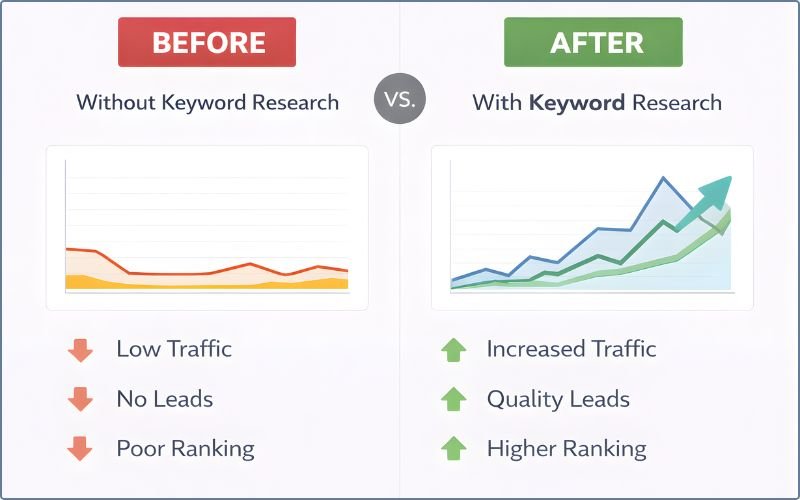
Affiliate marketers: Right keywords = higher commission earnings with less effort. You make the same effort, earn 10x more because the traffic converts.
Bloggers: Right keywords = predictable traffic growth. You know before you start that an article will rank.
Ecommerce owners: Right keywords = higher-intent customers ready to buy. Not browsers. Buyers.
Digital marketers: Right keywords = ROI-positive campaigns. You hit targets. Keep clients happy.
Your Three-Step Action Plan for Today
Do this today. Not tomorrow. Today.
Step One (Next 30 minutes)
Pick ONE topic you want to rank for (your main niche area).
Brainstorm 5-10 seed keywords using natural language, what would your customer search?
Put them in a Google Sheet or Excel file.
Step Two (Next 2 hours)
Use Google Keyword Planner or AnswerThePublic to expand your seed keywords to 50+ options.
Score each using the Tripod Rule:
- Good volume? (50+)
- Low-medium difficulty? (0-40)
- Good relevance? (matches your content)
Identify your top 3 “quick wins” keywords that hit all three legs of the tripod.
Step Three (Next 4 hours)
Take your #1 quick-win keyword.
Google it. Analyze the top 5 results using the 5-step SERP analysis framework:
- Content type—what format ranks?
- Authority—can you compete?
- SERP features—are they stealing clicks?
- Competitor angles—what’s missing?
- Final decision—should you target it?
If it passes, START WRITING. Your first article.
Next Steps After This Guide
Once you master SEO keyword research, you’re ready for:
On-page SEO: How to optimize each article with keyword placement, titles, headers, and internal links
Content strategy: How to build topic clusters and content hubs for topical authority
Link building: How to get backlinks that boost rankings
Technical SEO: How to make sure Google can crawl and index your site efficiently
Final Reminder
“Most beginners don’t fail because their content isn’t good enough. They fail because they chose the wrong keywords and put effort into ranking for keywords nobody searches for or keywords too competitive to win.”
Don’t be that person.
Do your keyword research. Use the Tripod Rule. Do SERP analysis. Pick winnable keywords. Write better content. Rank faster. Earn more.
Your audience is out there searching right now. This guide shows you exactly how to find them.
Now go find them.
Advertisment